


ReplyPen drafts every email reply. You just hit send.
ReplyPen is an AI email reply tool for businesses that answer customers in Gmail or Outlook. When you open your inbox, a draft is already waiting under every customer email you want answered, with the real details from your help pages and tools like Shopify. No prompting: you read it, adjust what you like and send.
Start your free trialNo credit card needed. Free for 7 days.


ReplyPen in a nutshell
Your whole business in view. Better answers, in less time.
ReplyPen connects your inbox, website and tools, and learns from every edit. With the full picture it writes answers that are right and sound like you, and soon it takes repetitive tasks off your plate too.
What ReplyPen reads





 Finds the answer
What you get
In your inbox
Work in the inbox you already use.
ReplyPen learns your tone and your usual answers from the emails you already sent, and its drafts land right in Gmail or Outlook. In Gmail the ReplyPen add-on sits next to each email: review a draft, see where it got its answer, fill in what only you know, or turn a few notes into a full reply.
 Write my reply
- Works on any email ReplyPen has read, also the ones it skipped
- In your tone, with the details from your tools
- Good or Needs work in one tap; ReplyPen learns from both
- Rewrite with one reason: too long, wrong tone, missing something
- Check a reply in seconds, without searching your help center
- Something wrong? Fix the source once, and the next draft gets it right too
- No made-up dates, prices or promises
- Answer once; ReplyPen remembers it for similar emails
In Gmail today. The Outlook add-in is coming; until then drafts land straight in your Outlook thread.
About the Gmail add-on →Inside ReplyPen
Easy to use. No technical skills needed.
Day to day you stay in Gmail or Outlook: that is about 95% of your time with ReplyPen. The app is the other 5%, where you check and adjust what ReplyPen learned, which emails get a draft and how they read. You change any of it in plain words: no prompts, no settings maze.
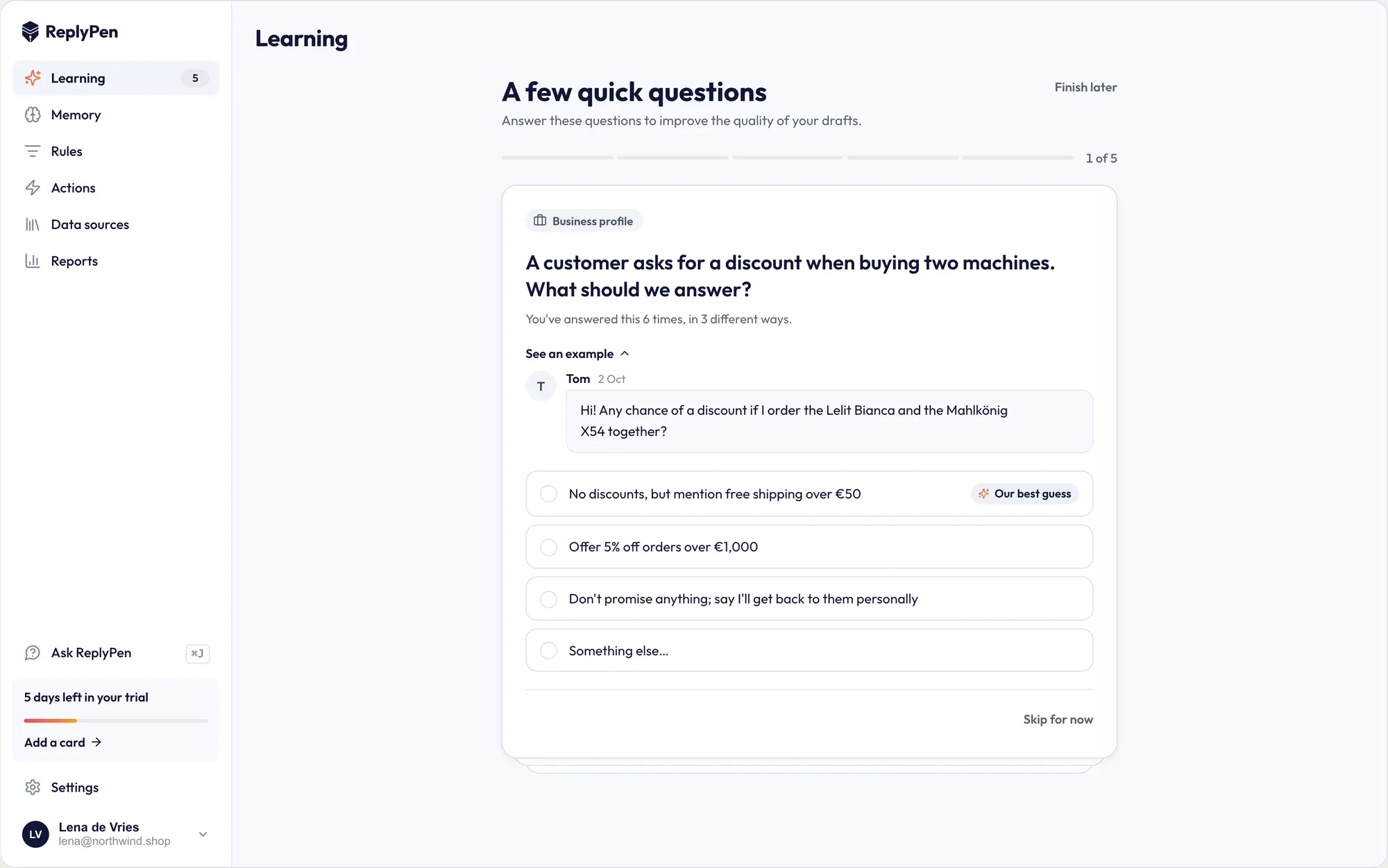
A few quick questions a day. Better drafts every day.
- ReplyPen asks when it is unsure, with its best guess marked
- One tap to answer, or skip for later
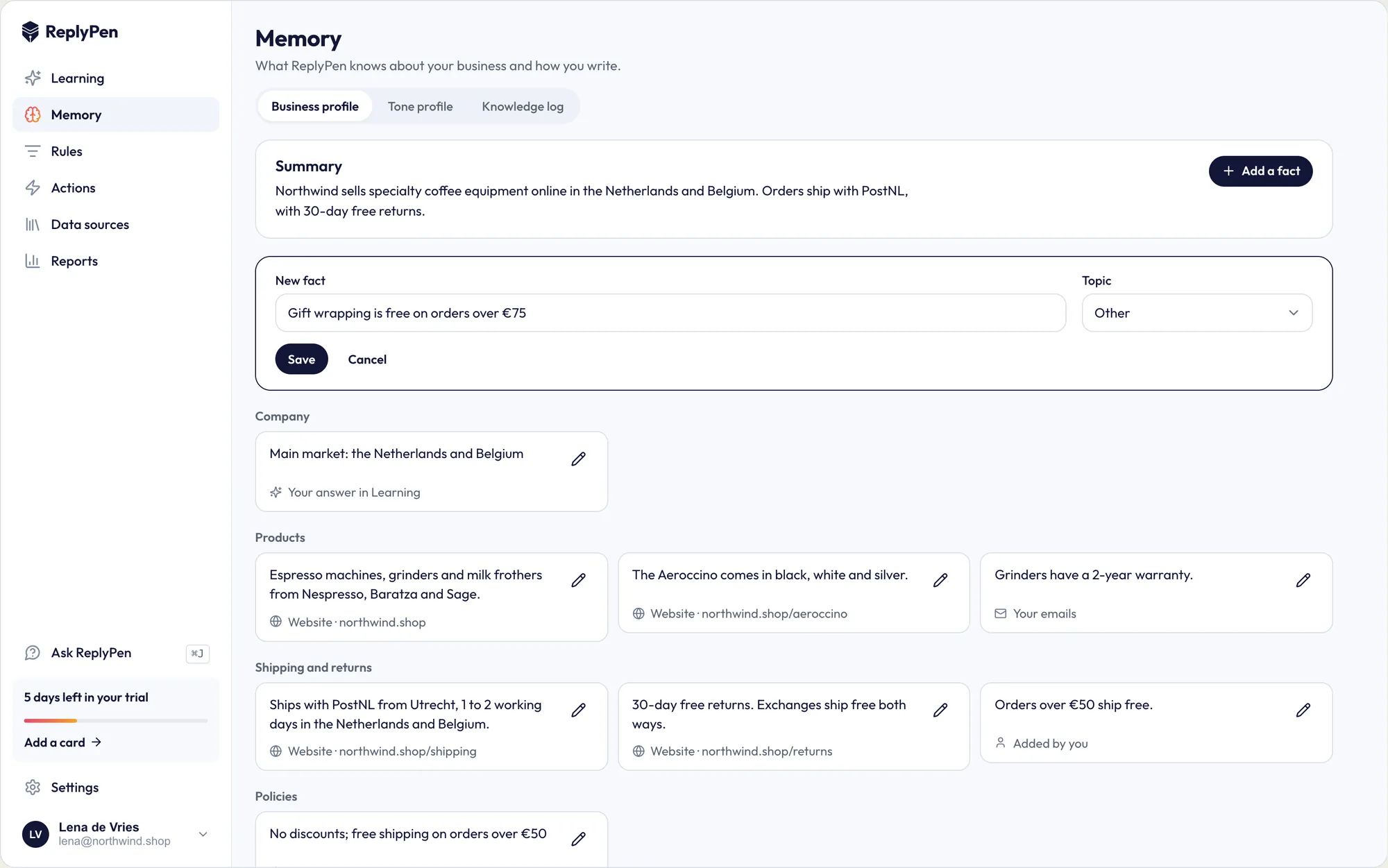
Everything it knows about you, in plain words you can change.
- Business profile, tone profile and every decision it made
- Fix a fact once; every next draft uses it
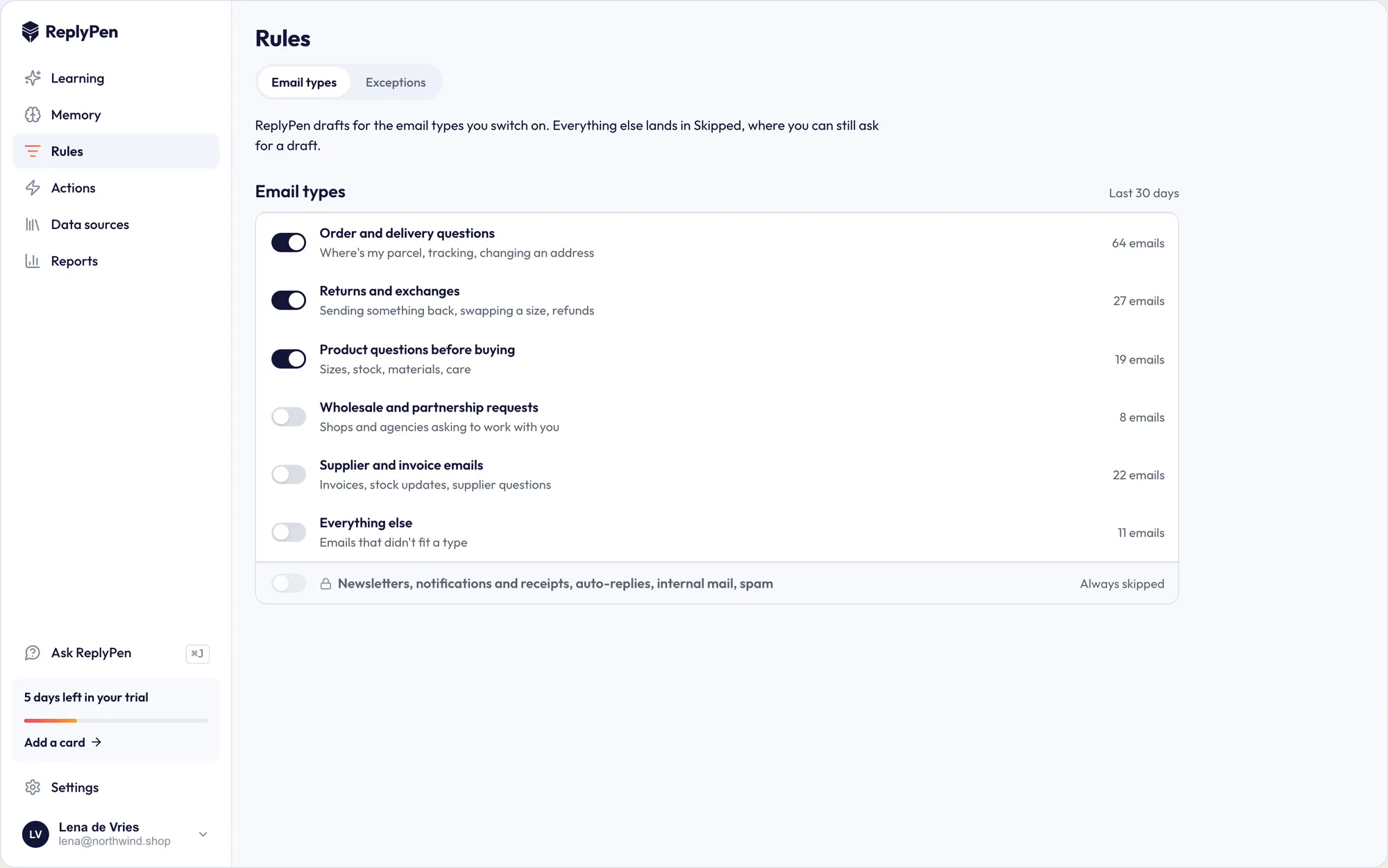
Drafts only where you want them.
- ReplyPen sorts your inbox into email types; tick the ones that get a draft. Newsletters, receipts and spam are skipped
- Add an exception for a sender, a domain or a word in the subject
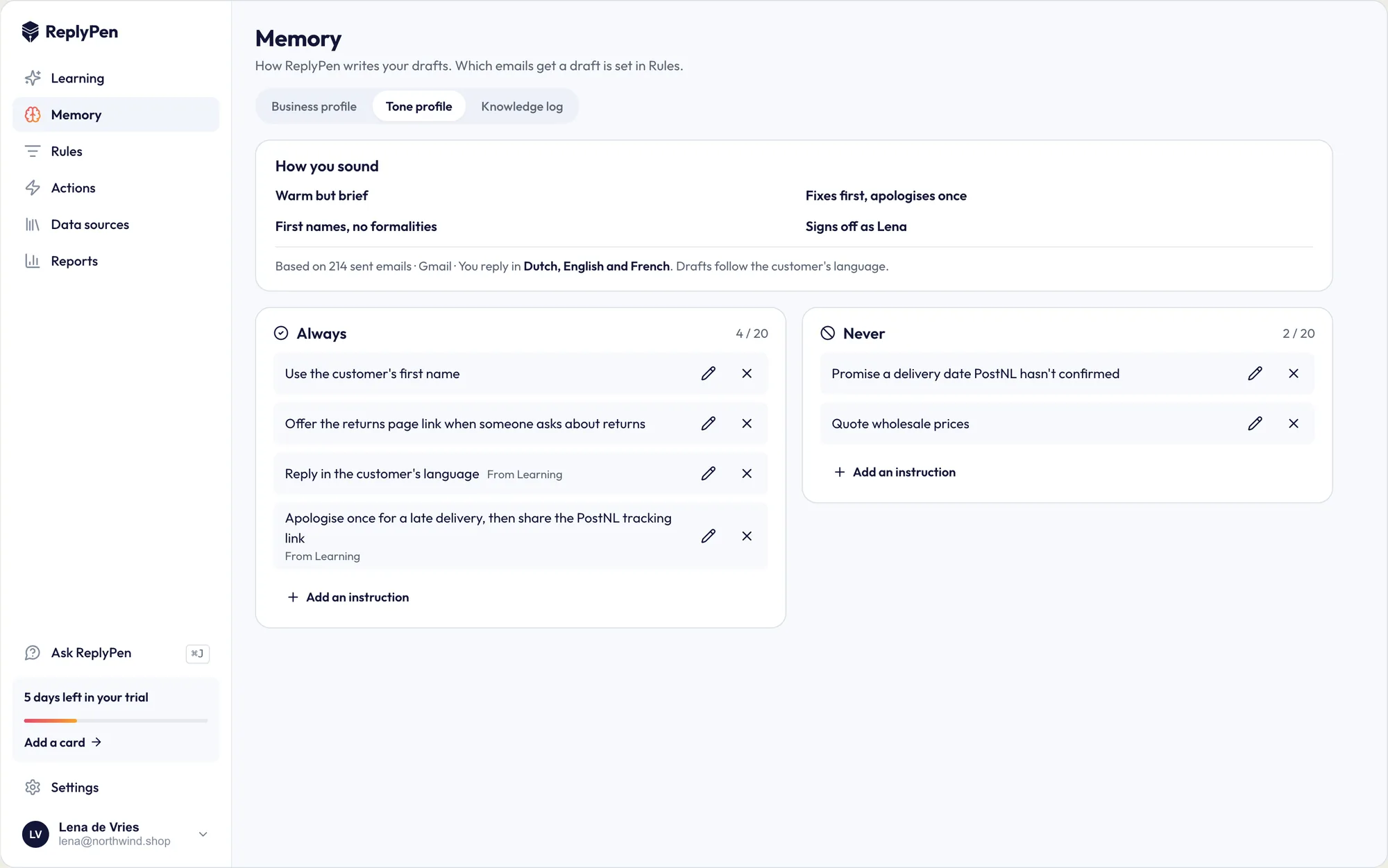
Want a scenario handled your way? Add an Always or Never instruction to your tone profile, e.g. 'When a delivery is late, apologise once and share the tracking link.'
Not sure how to set something up? Just ask.
- Ask in plain words, right in the app
- It suggests the change; nothing changes until you click Add
Data sources
Customer-specific answers, not a generic help article.
Most tools only link a help article. When a customer emails about their booking, contract, invoice or order, ReplyPen looks it up in your tools and puts the real details in the draft: the new time, the plan they are on, the invoice, the tracking link. Your instructions, such as 'Always share the tracking link', say which link goes in. You decide which tools are connected and what each may read, and ReplyPen only reads; it never changes anything there.
A customer emails
A customer emails
A customer emails
A customer emails







Also your help center, and for software companies, your code base.
Actions
Coming soonLess time on email. Less time on repetitive tasks.
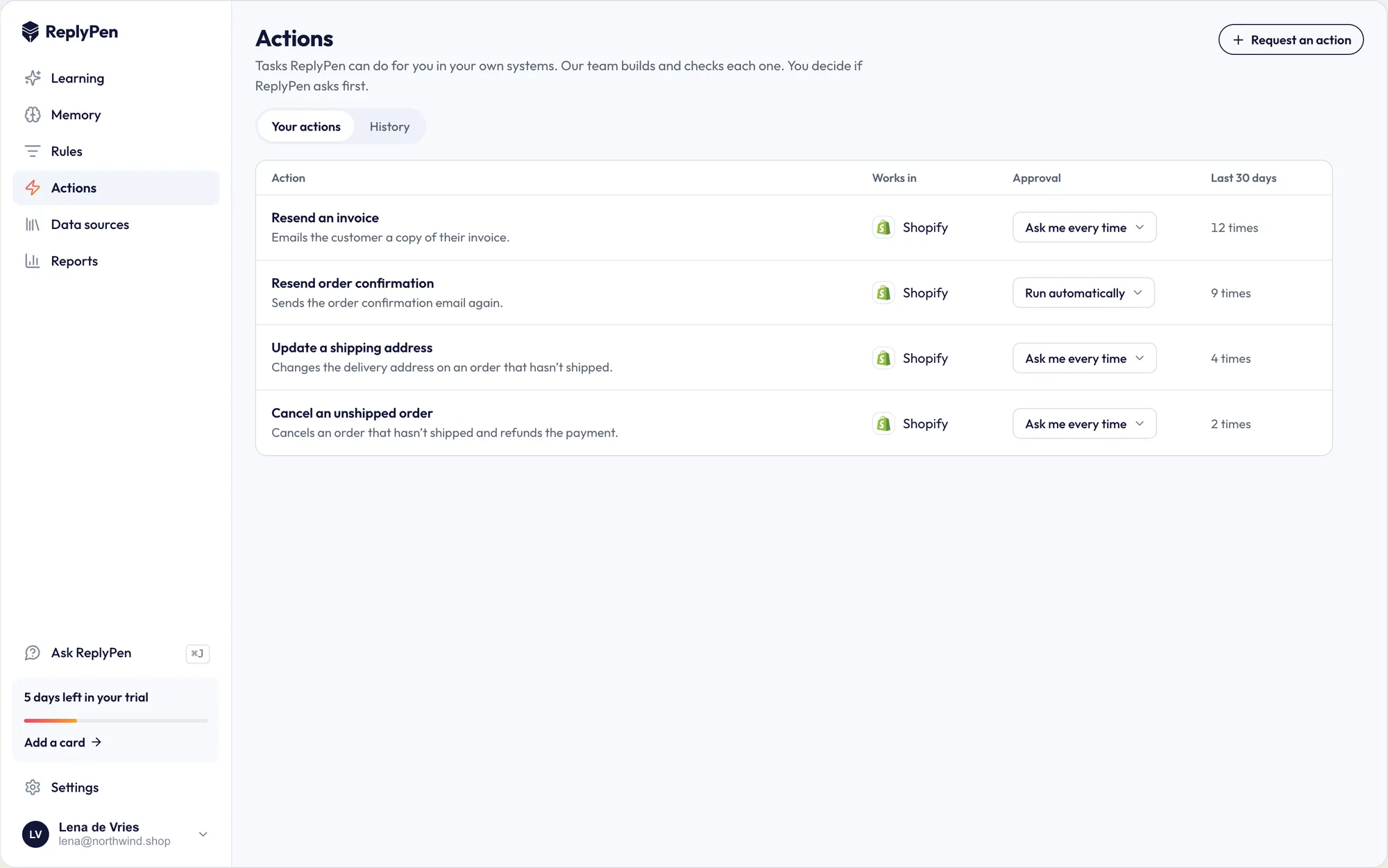
Many emails end in a small job in your CRM, shop or booking tool. Tell us the tasks you repeat, and we set them up as actions: ReplyPen prepares the refund, the address change or the moved appointment, and shows it as a button under the draft. You confirm, then send.
 ReplyPenStripe: payment for order #4821, €24.95
“Customer email used to take me two hours a day. With ReplyPen it takes ten minutes, and the quality of my answers is much better.”
Security
Privacy and control, built in.
ReplyPen only reads what you allow, stores your email copies in Frankfurt, and lets you take access back at any time. Your team gets the time back; you keep control.
GDPR and EU hosting
ReplyPen is run by ProBackup BV in Belgium. The copies of your emails that we keep to follow each conversation are stored with Amazon Web Services in Frankfurt, Germany.
Not used to train AI models
The AI providers we work with are not allowed to train their models on your email.
See exactly where your data goes →Access you can take back
The keys that give us access to your mailbox are encrypted with AES-256. Disconnect your inbox and our access ends.
Privacy policy →Your mail stays with you
ReplyPen never deletes anything from your mailbox. It adds drafts, and you're the one who sends.
You decide what it reads
You choose which tools are connected. For a database, we set up with you even which tables and fields it may read, so personal details it does not need stay out.
One setup for the whole team
Tone, email types, Memory and the actions a draft may propose are set once and shared. Nobody connects their own apps or writes their own prompts, and every action waits for your click.
Pricing
Simple, transparent pricing.
Pay per conversation, for a fraction of the time ReplyPen saves you.
A week on us
Your free week starts when ReplyPen starts drafting. No card needed.
- Every feature, on your real customer email
- After 7 days, add a card and pay only for what you use: €0.25 per conversation
- No card, no charge. Disconnect any time.
Calculate your cost
In how many customer email threads per month would you send a ReplyPen draft?
Your first 7 days are free. No card, no charge. Full pricing →
FAQ
Questions
Will ReplyPen send emails without me?
No. ReplyPen writes drafts, and you read and send them.
Do I have to change how I work?
No. Drafts appear in Gmail or Outlook as normal drafts, including on your phone. In Gmail the ReplyPen add-on sits next to each email, so you can review and improve a draft, write a reply from a few notes, or fill in what only you know. The web app is for Learning, Memory, Rules and Data sources.
Can ReplyPen do things, not just write?
Soon. Actions prepare small tasks like a refund or an address change; you confirm each one.
Which emails get a draft?
Customer emails that need a reply, for the email types you switched on. Newsletters, notifications, receipts, auto-replies, internal mail and spam are skipped. Exceptions let you skip or always draft for a sender, a domain or certain words.
What does ReplyPen use to write a draft?
Your help center, your website and the replies you've already sent, plus the tools we connect with you. The check note under each draft lists what it checked for that reply.
What if the answer isn't in any of those?
Edit the draft and send it as you normally would. ReplyPen learns from the change and notes it in Memory, so the next similar email goes better.
Which languages does it write in?
Drafts are written in the language your customer wrote in.
Can my team use it?
Today ReplyPen works with one mailbox and one voice. A shared address like support@ is fine. Inviting teammates is coming.
Do you store my emails?
We keep copies of the messages we handle so we can follow each conversation. They're stored in Frankfurt, and our AI providers are not allowed to train on them. Where your data goes →
What happens after the free week?
Add a card to keep going and pay for what you use. If you don't add one, you're not charged.
Answer your customers well, in less time.
Connect your inbox and see a draft for a real customer email today.
Start your free week